> ## Documentation Index
> Fetch the complete documentation index at: https://tutorials.spellslate.com/llms.txt
> Use this file to discover all available pages before exploring further.
# Editing your title page
# Editing your title page
Use the title page to set the script title, author, and contact details. Whatever you enter here is used when you export the script to PDF, so the first page of the PDF shows the correct credits and contact info.
## Open the title page
1. Open your project and click **Writing → Script** in the nav.
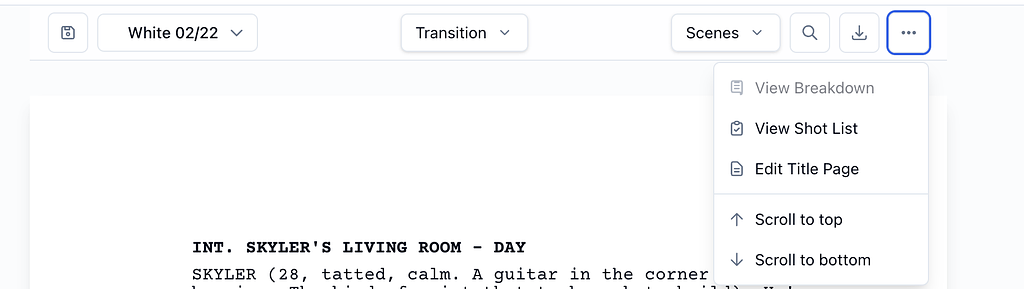
2. In the script editor toolbar, open the **More** menu (the three-dot icon).
3. Click **Edit Title Page**. The title page modal opens.
 ## Fill in the fields
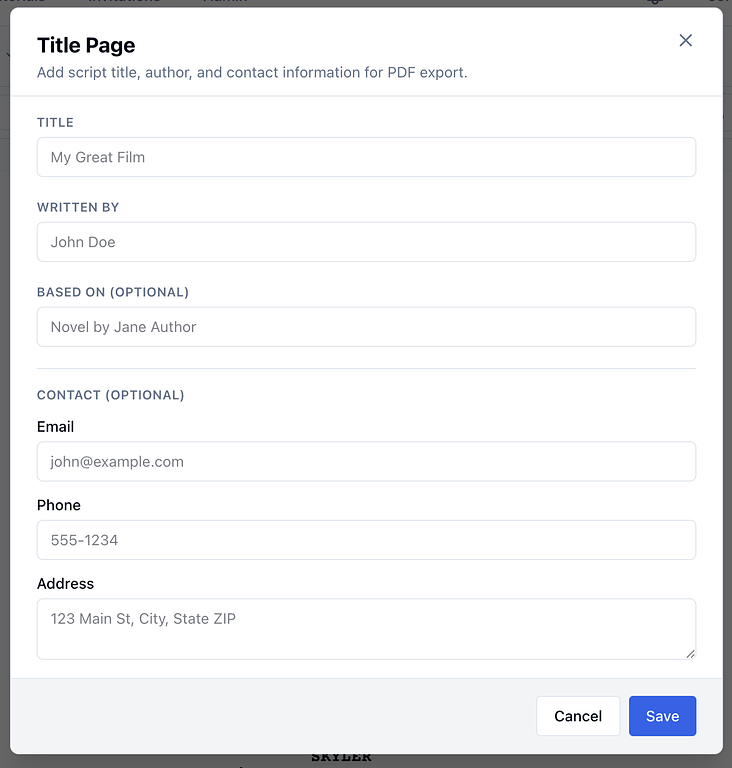
* **Title:** The name of the script (e.g. your film or episode title). If you leave it blank, the PDF uses the project name.
* **Written by:** The writer's name. This appears under "Written by" on the PDF title page.
* **Based on (optional):** e.g. "Novel by Jane Author" if the script is based on another work.
**Contact (optional):** Your contact details on the PDF:
* Email
* Phone
* Address
**More (optional):** Extra info that can appear on the PDF:
* Agent name, email, and phone
* Draft date
* Copyright (e.g. © 2024)
## Save or cancel
* Click **Save** to store your changes. The next time you export the script to PDF, the title page will use this information.
* Click **Cancel** or the X to close without saving.
You can open **Edit Title Page** anytime from the script editor. Update the fields and save again when your title, author, or contact info changes.
## Fill in the fields
* **Title:** The name of the script (e.g. your film or episode title). If you leave it blank, the PDF uses the project name.
* **Written by:** The writer's name. This appears under "Written by" on the PDF title page.
* **Based on (optional):** e.g. "Novel by Jane Author" if the script is based on another work.
**Contact (optional):** Your contact details on the PDF:
* Email
* Phone
* Address
**More (optional):** Extra info that can appear on the PDF:
* Agent name, email, and phone
* Draft date
* Copyright (e.g. © 2024)
## Save or cancel
* Click **Save** to store your changes. The next time you export the script to PDF, the title page will use this information.
* Click **Cancel** or the X to close without saving.
You can open **Edit Title Page** anytime from the script editor. Update the fields and save again when your title, author, or contact info changes.