> ## Documentation Index
> Fetch the complete documentation index at: https://tutorials.spellslate.com/llms.txt
> Use this file to discover all available pages before exploring further.
# First schedule
# Your first schedule
After you break down your script, Spell Slate creates a **schedule (stripboard)** for you by default. It stays in sync when your script and locations are updated.
1. Go to the **Schedule** tab. Your scenes are already on the stripboard.
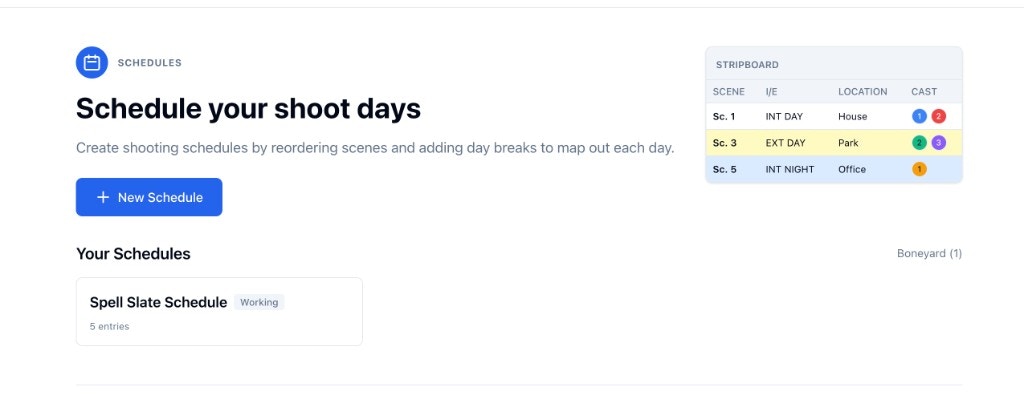 2. Open your schedule to see the full stripboard. Create **day breaks** to group scenes into shoot days.
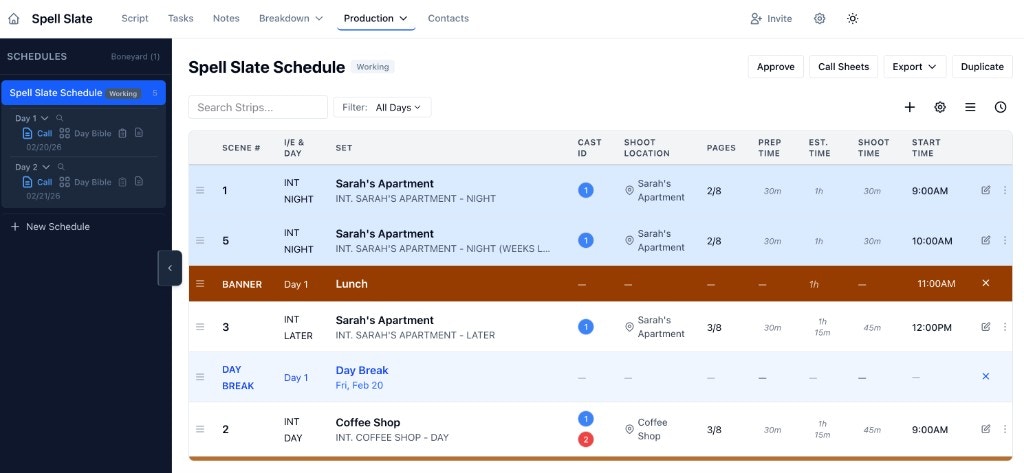 3. Add any info about each day break you want. You can do this later too.
4. Use the stripboard toolbar (top right) for quick schedule setup:
* **Display button** (sliders icon): show or hide fields like Start Time, End Time, Notes, and more.
* **Three lines icon**: **Reorder Strips** to auto-sort scenes by the rules you choose.
* **Clock icon**: **Reset Times** to clear clock times and/or duration estimates when you need a clean timing pass.
5. When this version is ready for the team, click **Approve**. Approved schedules are the version used for call sheets and schedule-based reports.
Once you have days defined, you can create call sheets for each shoot day. For more detail, see [Stripboard and shoot days](/stripboard-and-days) and [Approving a schedule and Boneyard](/approving-and-boneyard).
3. Add any info about each day break you want. You can do this later too.
4. Use the stripboard toolbar (top right) for quick schedule setup:
* **Display button** (sliders icon): show or hide fields like Start Time, End Time, Notes, and more.
* **Three lines icon**: **Reorder Strips** to auto-sort scenes by the rules you choose.
* **Clock icon**: **Reset Times** to clear clock times and/or duration estimates when you need a clean timing pass.
5. When this version is ready for the team, click **Approve**. Approved schedules are the version used for call sheets and schedule-based reports.
Once you have days defined, you can create call sheets for each shoot day. For more detail, see [Stripboard and shoot days](/stripboard-and-days) and [Approving a schedule and Boneyard](/approving-and-boneyard).