> ## Documentation Index
> Fetch the complete documentation index at: https://tutorials.spellslate.com/llms.txt
> Use this file to discover all available pages before exploring further.
# How to rename an element
# How to rename an element
> **Who can do this:** Free plan on your first project, Supporter on all projects. Renaming needs project edit access. Members with view access see the names but no pencil.
Elements take their name from the script. A prop is the word you highlighted, a character is the dialogue cue, a location is the scene heading. The prop master calls it "the brass coffee tin" and the cast list should say "Maya Torres", not "MAYA". Rename the element and leave the script alone.
Find elements under **Breakdown** → **Elements**, in **Scene Elements** on a scene's breakdown page, and on each element's board.
## Rename a prop or any other tagged element
Props, set dressing, costumes, vehicles, and every other tagged element rename the same way.
1. Open the category under **Breakdown** → **Elements**, for example **Props**.
2. Hover the name and click the pencil.
3. Type the new name.
4. Press **Enter**, or click **Save**.
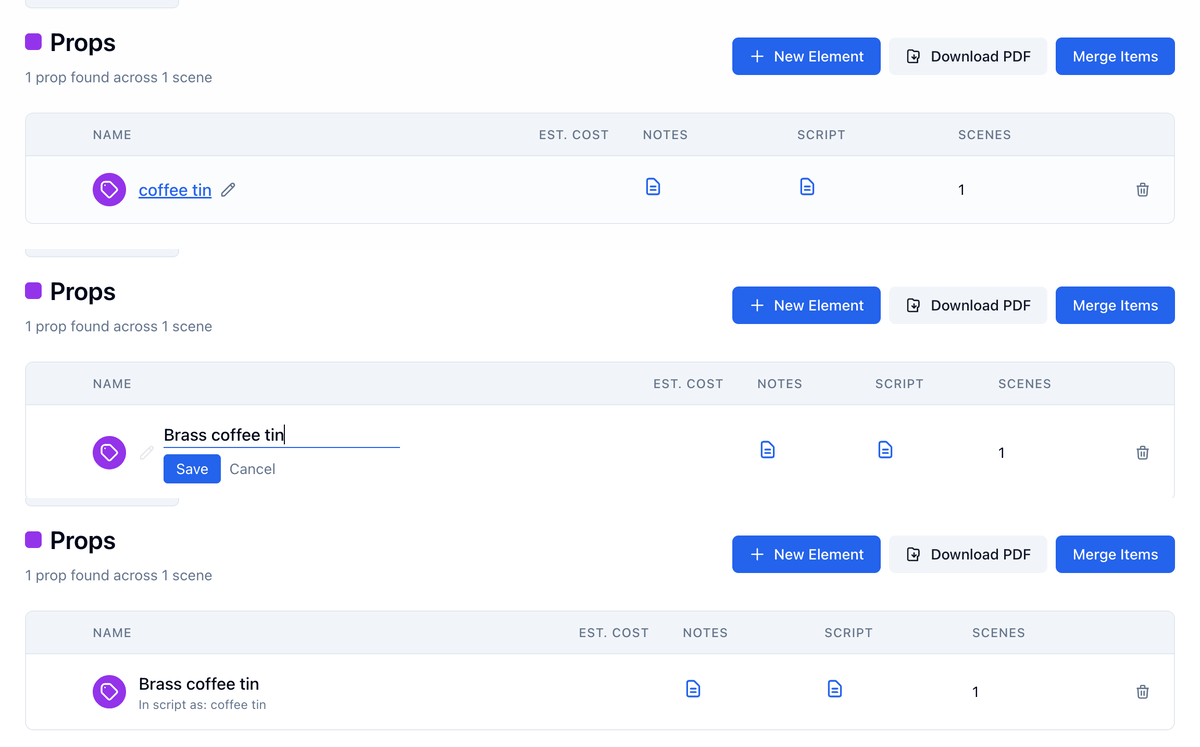 The new name applies to every scene the element is tagged in, and to any scene you tag it in later. Names are limited to 120 characters. **Escape** or **Cancel** leaves the name as it was.
You can also rename from the scene you are working in, or from the element's board:
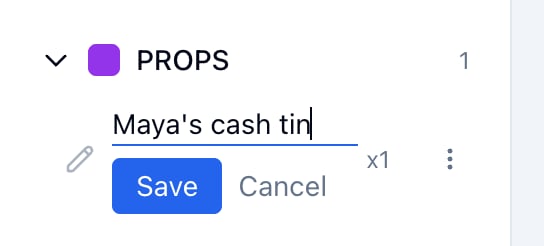
* On a scene's breakdown page, hover the element in **Scene Elements** and click the pencil. **Save** and **Cancel** sit under the field.
* On the element's board, click the name in the header, or the pencil beside it.
The new name applies to every scene the element is tagged in, and to any scene you tag it in later. Names are limited to 120 characters. **Escape** or **Cancel** leaves the name as it was.
You can also rename from the scene you are working in, or from the element's board:
* On a scene's breakdown page, hover the element in **Scene Elements** and click the pencil. **Save** and **Cancel** sit under the field.
* On the element's board, click the name in the header, or the pencil beside it.
 ## Rename a character
1. Open **Breakdown** → **Elements** → **Cast Members**, or the character's board.
2. Hover the name and click the pencil. On the board, click the name in the header.
3. Type the new name.
4. Press **Enter**, or click **Save**.
## Rename a character
1. Open **Breakdown** → **Elements** → **Cast Members**, or the character's board.
2. Hover the name and click the pencil. On the board, click the name in the header.
3. Type the new name.
4. Press **Enter**, or click **Save**.
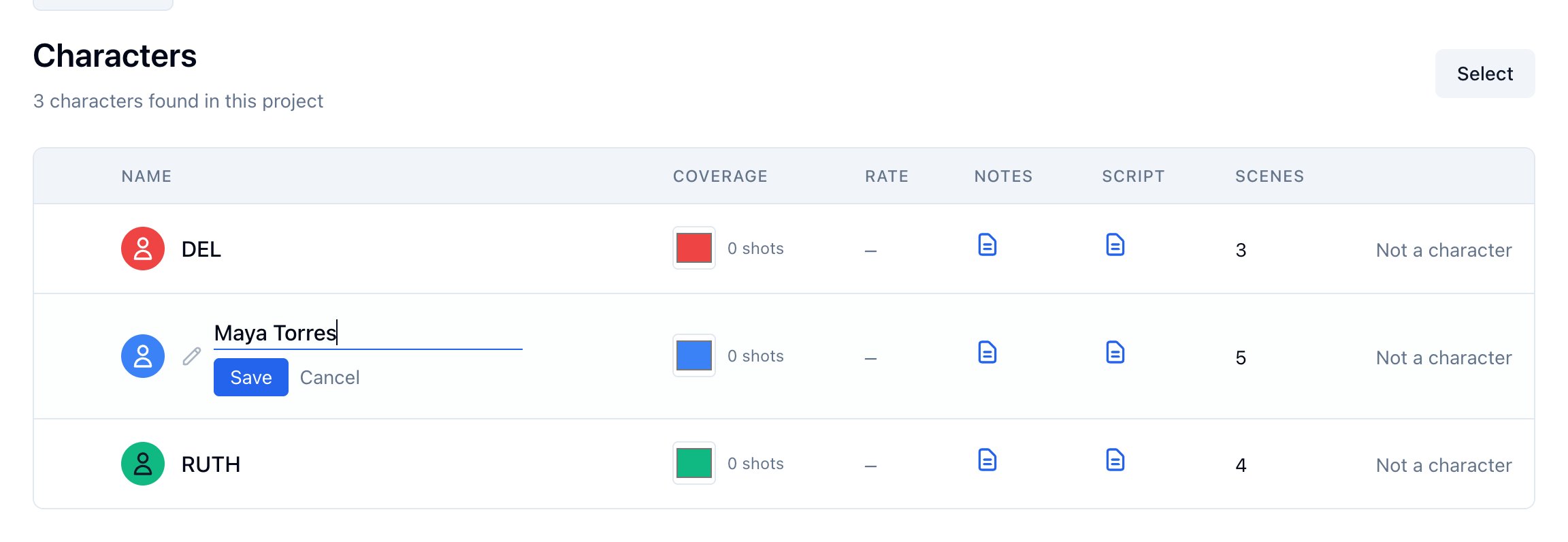 A parenthetical on a name, like (V.O.) or (CONT'D), reads as a delivery note and is left off. So does a V.O., O.S., or O.C. typed in front of the name. The message after the save says so. Names are limited to 40 characters.
Every cue that meant this character still does. Spell Slate remembers that MAYA now means Maya Torres, so a later script version or a manual tag of "MAYA" lands on her, not on a new character.
## Rename a location
1. Open **Production** → **Locations**, or **Breakdown** → **Elements** → **Locations**, or the location's board.
2. Hover the name and click the pencil. On the board, click the name in the header.
3. Type the new name.
4. Press **Enter**, or click **Save**.
A parenthetical on a name, like (V.O.) or (CONT'D), reads as a delivery note and is left off. So does a V.O., O.S., or O.C. typed in front of the name. The message after the save says so. Names are limited to 40 characters.
Every cue that meant this character still does. Spell Slate remembers that MAYA now means Maya Torres, so a later script version or a manual tag of "MAYA" lands on her, not on a new character.
## Rename a location
1. Open **Production** → **Locations**, or **Breakdown** → **Elements** → **Locations**, or the location's board.
2. Hover the name and click the pencil. On the board, click the name in the header.
3. Type the new name.
4. Press **Enter**, or click **Save**.
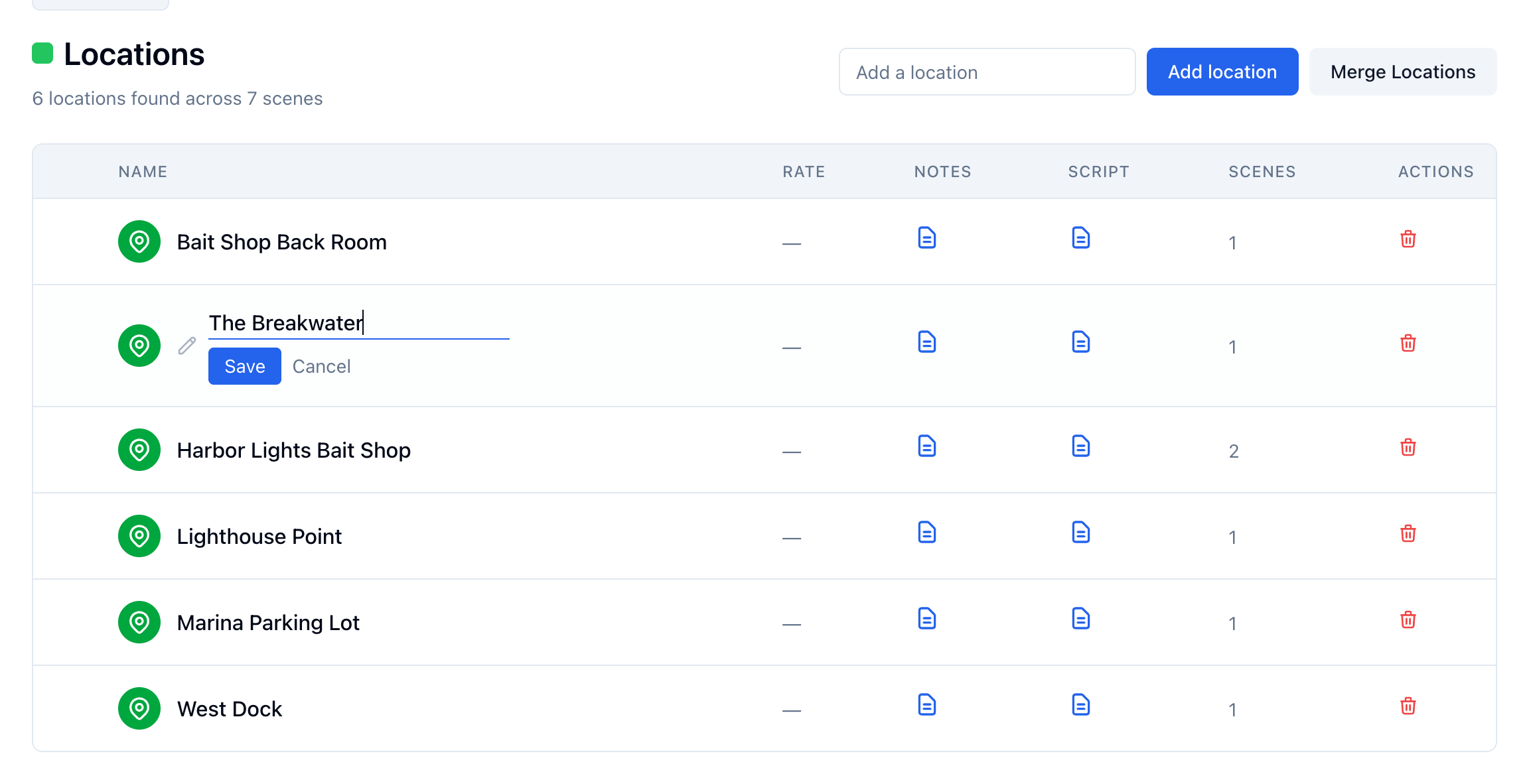 The new name shows on the Locations list, the board, the Production Bible, and PDFs. A call sheet copies location names when you pull locations in, so a sheet built before the rename keeps the old name until you pull them again. Names are limited to 120 characters.
## What stays the same
The script text is not changed. The element keeps every scene link, its board, and its cards.
The breakdown still highlights the original word in the script, labelled with the new name. A renamed element shows **In script as:** with the original word on its board and on its category page, so the highlight and the name never read as two different elements.
A budget line named after the element takes the new name too. A line somebody retitled in the budget keeps that title. A location's or a character's line takes the new name the next time you open the budget; a character's line carries the cast member's name once someone is cast.
## When a name is already taken
If the name you type already belongs to another element of the same kind, Spell Slate says so and changes nothing.
The new name shows on the Locations list, the board, the Production Bible, and PDFs. A call sheet copies location names when you pull locations in, so a sheet built before the rename keeps the old name until you pull them again. Names are limited to 120 characters.
## What stays the same
The script text is not changed. The element keeps every scene link, its board, and its cards.
The breakdown still highlights the original word in the script, labelled with the new name. A renamed element shows **In script as:** with the original word on its board and on its category page, so the highlight and the name never read as two different elements.
A budget line named after the element takes the new name too. A line somebody retitled in the budget keeps that title. A location's or a character's line takes the new name the next time you open the budget; a character's line carries the cast member's name once someone is cast.
## When a name is already taken
If the name you type already belongs to another element of the same kind, Spell Slate says so and changes nothing.
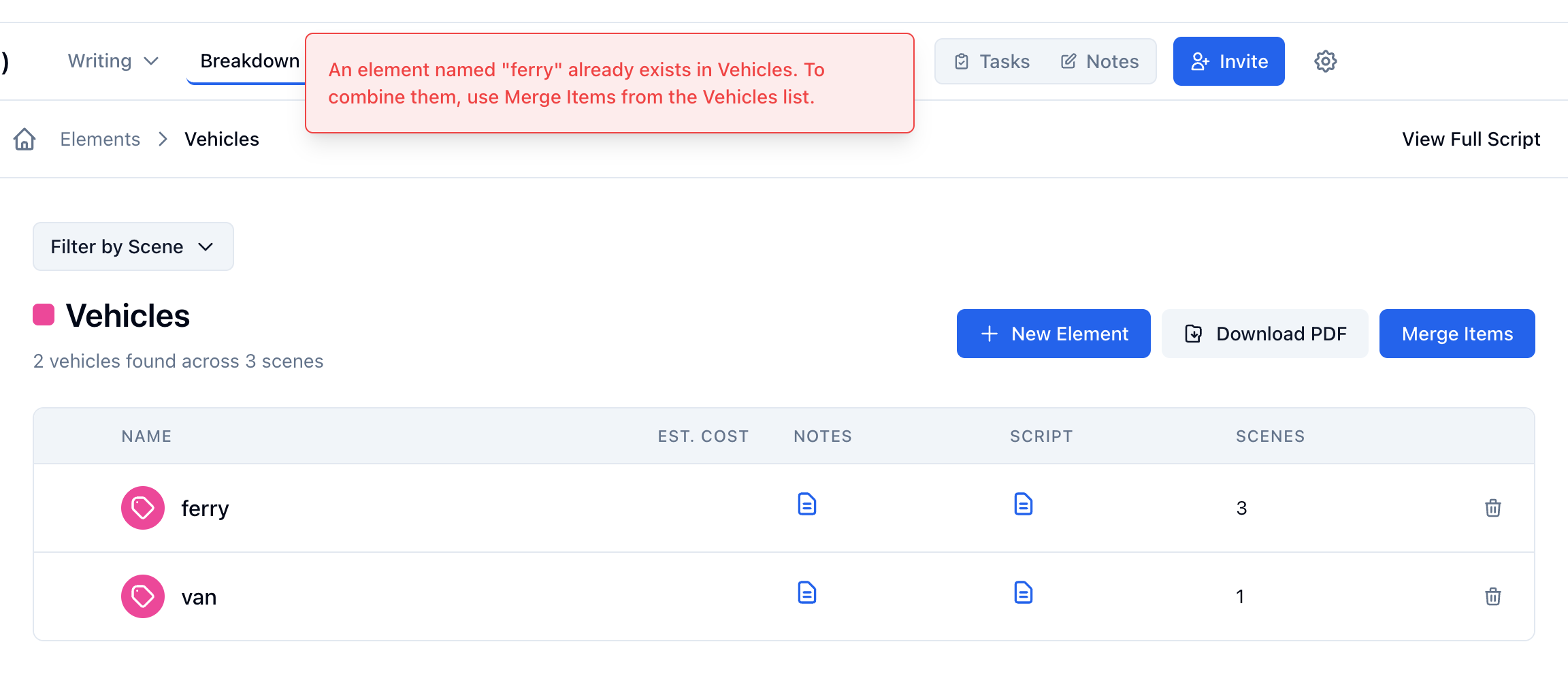 To combine two elements, merge them instead:
* Props and other elements: **Merge Items** on the category page.
* Characters: **Select** on the Cast Members list, tick both, then **Merge**. The one you ticked first is kept.
* Locations: **Merge Locations** on the Locations page.
## Related
* [How to change element type](/how-to-change-element-type)
* [Merging duplicate characters or locations](/merging-duplicate-characters-or-locations)
* [Managing props](/managing-props)
* [Managing characters](/managing-characters)
* [Managing locations](/managing-locations)
This documentation is built and hosted on [Mintlify](https://mintlify.com), a developer documentation platform.
To combine two elements, merge them instead:
* Props and other elements: **Merge Items** on the category page.
* Characters: **Select** on the Cast Members list, tick both, then **Merge**. The one you ticked first is kept.
* Locations: **Merge Locations** on the Locations page.
## Related
* [How to change element type](/how-to-change-element-type)
* [Merging duplicate characters or locations](/merging-duplicate-characters-or-locations)
* [Managing props](/managing-props)
* [Managing characters](/managing-characters)
* [Managing locations](/managing-locations)
This documentation is built and hosted on [Mintlify](https://mintlify.com), a developer documentation platform.