

Budget
Who can do this: Free plan on your first project, Supporter on all projects. Opening the budget and downloading exports needs the organization owner, an admin, or a member with View budget or Manage crew contacts. Adding and editing lines, logging payments, and setting rates needs the owner, an admin, or a member with Manage crew contacts.The budget is the breakdown with prices on it. Every tagged prop, every speaking part, every location, and every camera on the shot list already has a line waiting for a number, and the cast lines count their own days off the schedule. Where to find it: open Production and click Budget.
Open the budget
The first visit pulls every element in the breakdown into the budget. After that, the page has four parts: the actions across the top, the Cast / schedule card, a warning when call-sheet crew have no line yet, and one table per category. The sidebar lists the categories and lets you collapse itself to make room on a laptop.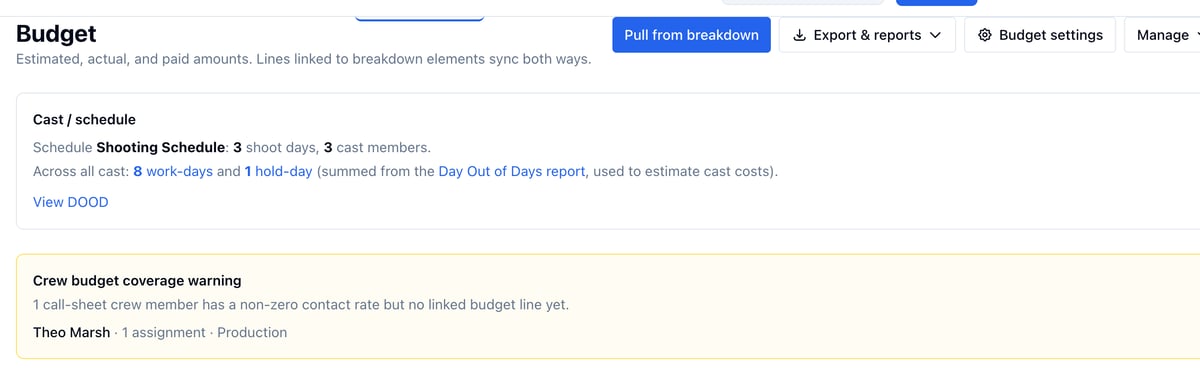
- Pull from breakdown picks up new elements. See Pull from breakdown and categories.
- Export & reports holds CSV, PDF, Excel, the topsheet, and the fringe report. See Fringe and export.
- Budget settings sets who prepared it, the date, and the prep, shoot, wrap, and post weeks.
- Manage opens Categories and Fringe types.
- Display shows or hides columns.
Read a line
Each line shows Qty, Rate, Estimated, Actual, Paid, Payable, and Total, with Fringe and Variance available under Display. Click the chevron next to a description to open the line’s details: where it came from, its payments, and Manage payments.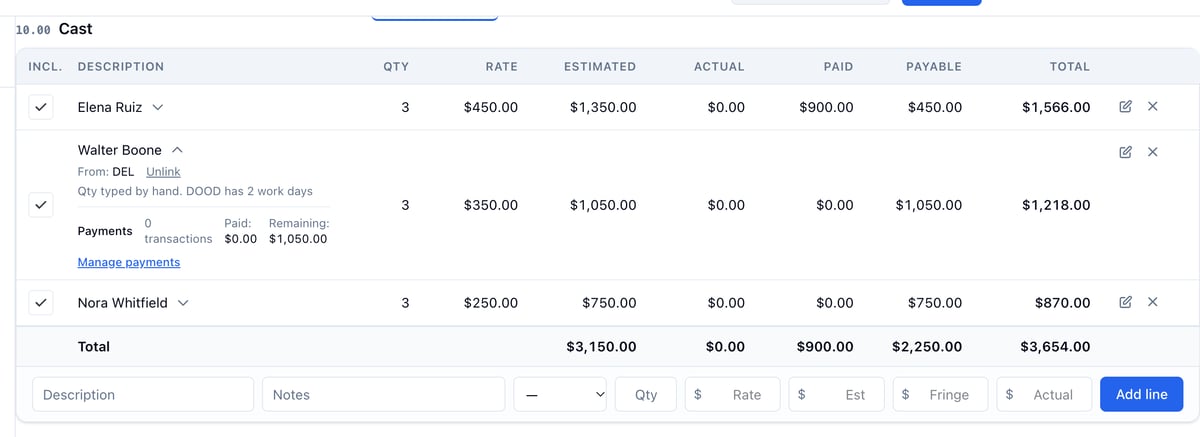
The Total row at the bottom of each category and the Grand total at the end of the page count only the lines and categories that are checked as included.
Cast lines and the schedule
The Cast / schedule card at the top sums work-days and hold-days across every cast member from the Day Out of Days. Each cast line’s Qty is that character’s work days, so the estimate moves with the schedule. Type your own quantity to pay through hold days, and Use DOOD days in the edit form to go back. See Line items and board sync.Example: Del’s hold day
Del shoots Saturday and Monday and is held on Sunday. His line shows Qty 3 because the producer typed it, and the details read “Qty typed by hand. DOOD has 2 work days.” At $350.00 a day his estimate is $1,050.00, and the card above counts his Sunday among the 1 hold-day.Itemize an element
An element that is really several priced things, like a set of life vests, gets one budget line that expands to each item. Add the items from the Budget section on the element’s board, and the budget shows their total on the line and each item underneath.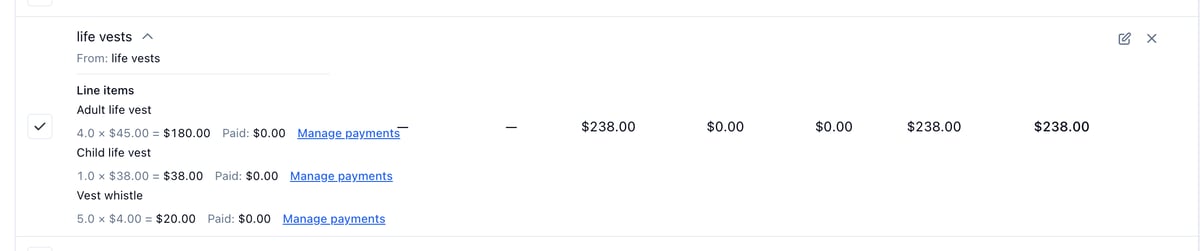
Log a payment
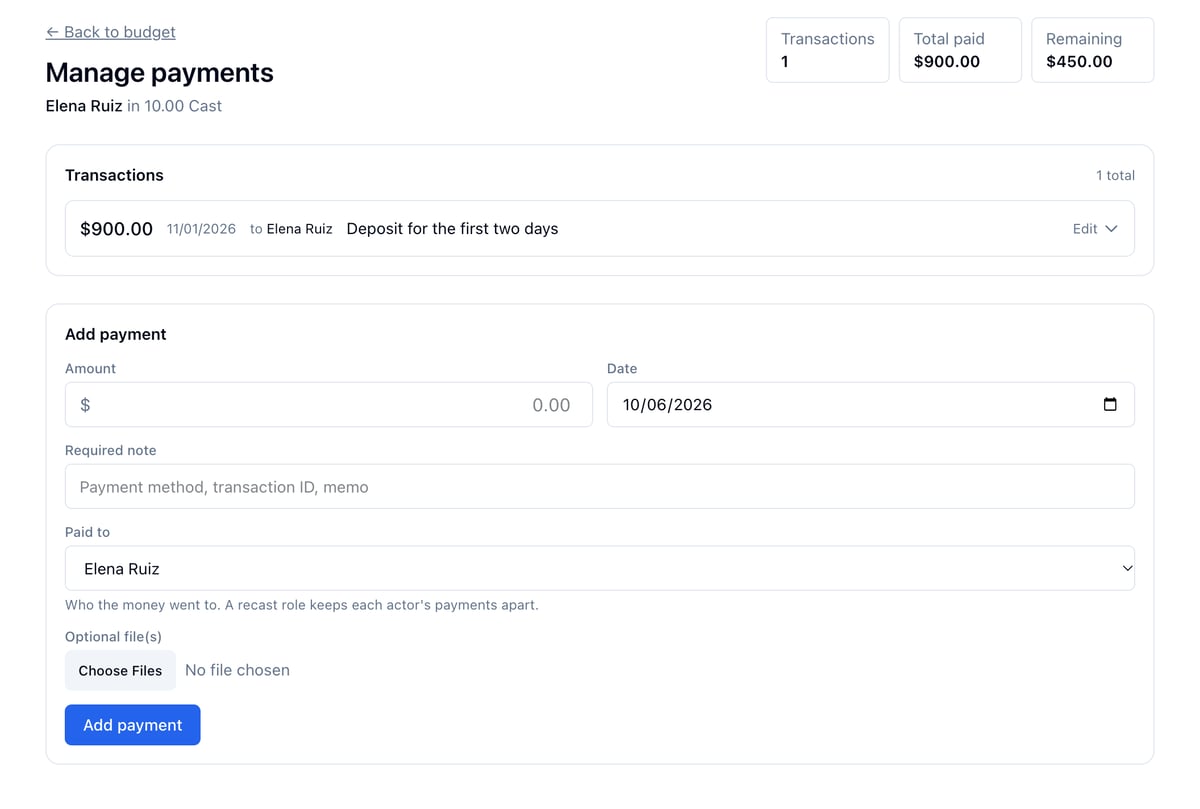
- Click the chevron next to the line, then Manage payments.
- Under Add payment, enter the Amount, the Date, and a Required note. Attach a receipt if you have one.
- Check Paid to. It is already set to the person the line pays today: the actor on a cast line, the crew member on a crew line. Change it if the money went to someone else.
- Click Add payment.
Example: a recast role
Walter Boone played Del for the first weekend and was paid a $700.00 deposit. He drops out and Marcus Boone takes over. The Del line keeps Walter’s payment and adds Marcus’s, so the role’s Paid shows both and the line’s details read “Paid to: Marcus Boone $350.00 · Walter Boone $700.00”. Walter’s contact page shows only his $700.00, and Marcus’s shows only his $350.00.Fill a crew line from the address book
When you add a line for a crew member, type @ in Description and pick the person. Their name, rate, and pay unit fill in from the address book, and the line is linked to their contact.
Example: the 1st AD is on the call sheet but not the budget
Theo Marsh is on Day 1’s call sheet with a $700.00 day rate on his contact, and the warning names him. Under 12.00 Production Staff, type @Theo in Description, pick him, set Qty to 3, and click Add line. The warning clears on the next visit.Who can see and edit the budget
- Owner and admins can do everything: lines, payments, rates on contacts and cast members, Cost / Budget cards.
- Members with Manage crew contacts can do the same.
- Members with View budget can open the budget, see cost cards and rates, and download every export, but cannot change anything.
- Other members do not see the Budget link, cost cards, or rate fields at all.