

Download your script
You can export your script from Spell Slate in three formats: PDF, Text, and Fountain. Each is useful for different purposes.Where to find Export
Go to Writing → Script in the project nav, then open the Export dropdown in the toolbar. It appears in both read mode (when viewing the script) and edit mode (when editing in the Fountain editor). You can also open the Download menu from the Script & Breakdown card on a project’s main page.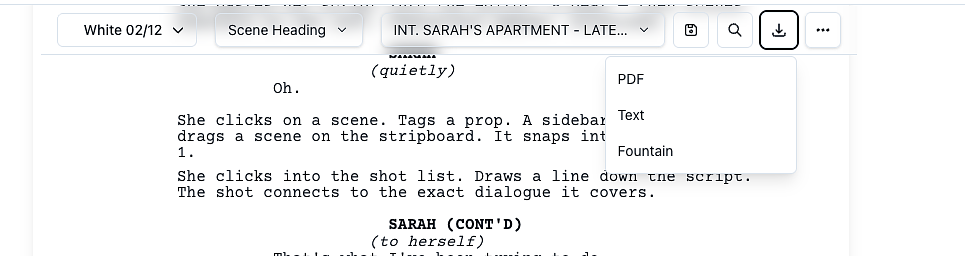
Export options
- Export PDF: A formatted screenplay (industry-standard layout, Courier 12pt). Opens in a new tab. Use this for printing, sharing with collaborators, or submissions.
- Export Text: Plain text with character names and dialogue indented, scene headings flush left. Good for Celtx-style workflows or simple text editors.
- Export Fountain: Fountain (.fountain) format. This is the best option for backup or use in other screenwriting tools (Final Draft, Highland, WriterDuet, etc.).
Print scene numbers on a PDF
A reading script has clean scene headings. A script you carry on set needs the number, so you can tell at a glance which scene you are shooting.- Open the Export menu.
- Tick Include scene numbers under Export PDF.
- Click Export PDF.
Share a link instead of attaching the PDF
Texting a PDF file is hit or miss. If the reader only needs to read the script, pick Share view-only link at the bottom of the same Export menu and send them a link instead: it opens as a PDF in their browser with no sign-in, and you can revoke it any time.